Formlabs launches the Form Mobile app and PreForm Projects to help teams monitor prints remotely and organize complex multi-printer builds with ease.
Monitor Every Print From Your Pocket
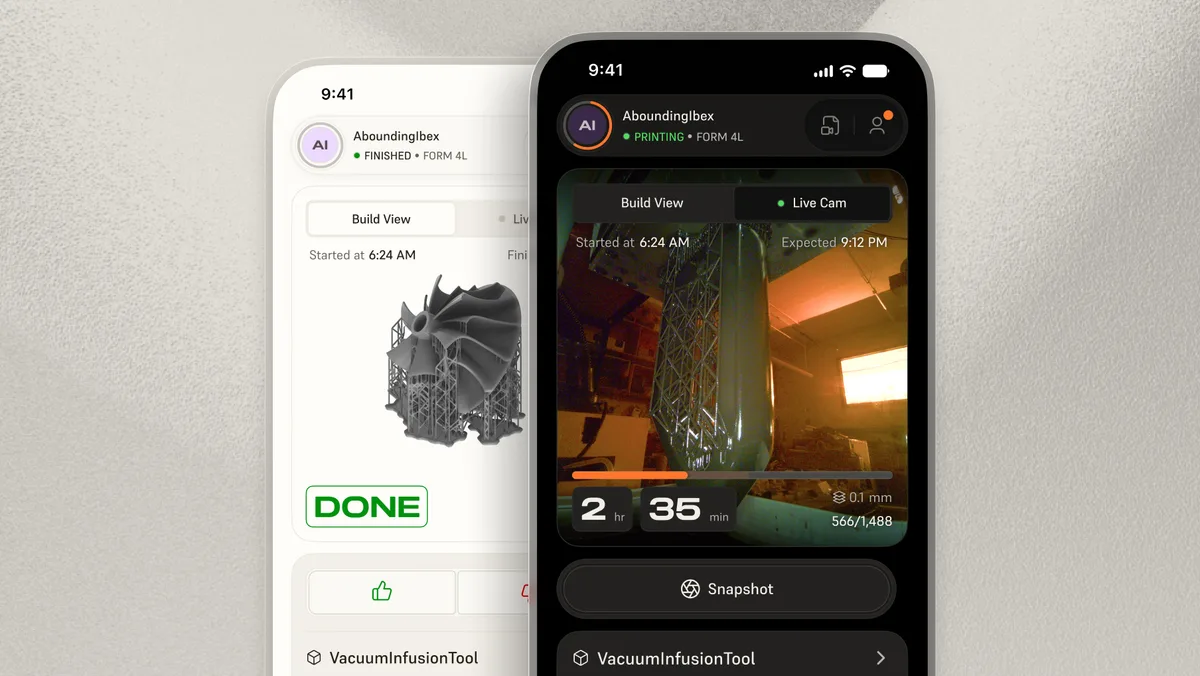
Formlabs has released the Form Mobile app, a free tool that keeps you connected to your printers whether you're across the room or across the building. From the app you can check real-time print status, browse your printer's queue and history, start queued or previously completed jobs, and watch a live camera feed of any active print. Push notifications alert you the moment a job finishes or needs attention — no more walking the shop floor just to check a countdown timer.
Supported Printers
At launch, Form Mobile is compatible with the Form Studio 1, Form 4, Form 4B, Form 4L, and Form 4BL SLA 3D printers. Support for the Fuse Series SLS printers is on the way. Setup is a single step: scan the QR code on the printer to link it to your Formlabs account. The app is available now on both iOS (App Store) and Android (Google Play).
Organize Complex Jobs With PreForm Projects
Large assemblies often involve dozens — or even hundreds — of individual parts spread across different materials and printer types. PreForm Projects, introduced in PreForm version 3.62.0, addresses this by letting you group multiple build volumes inside a single .form file. You can mix printer types and materials within one project, switch between builds from a dedicated project panel, and move parts freely as your plan evolves.
Realistic Rendering Mode
A new Realistic Rendering Mode in PreForm lets you visualize how a part will look before committing to a print, helping teams catch design issues earlier and reduce wasted material.
Why It Matters for Your Workflow
Together, Form Mobile and PreForm Projects tackle two of the most time-consuming parts of the printing process: staying informed while a job runs, and staying organized while preparing one. Both features are available now — download the latest PreForm and grab the Form Mobile app to get started.