Official Anycubic distributor in Thailand
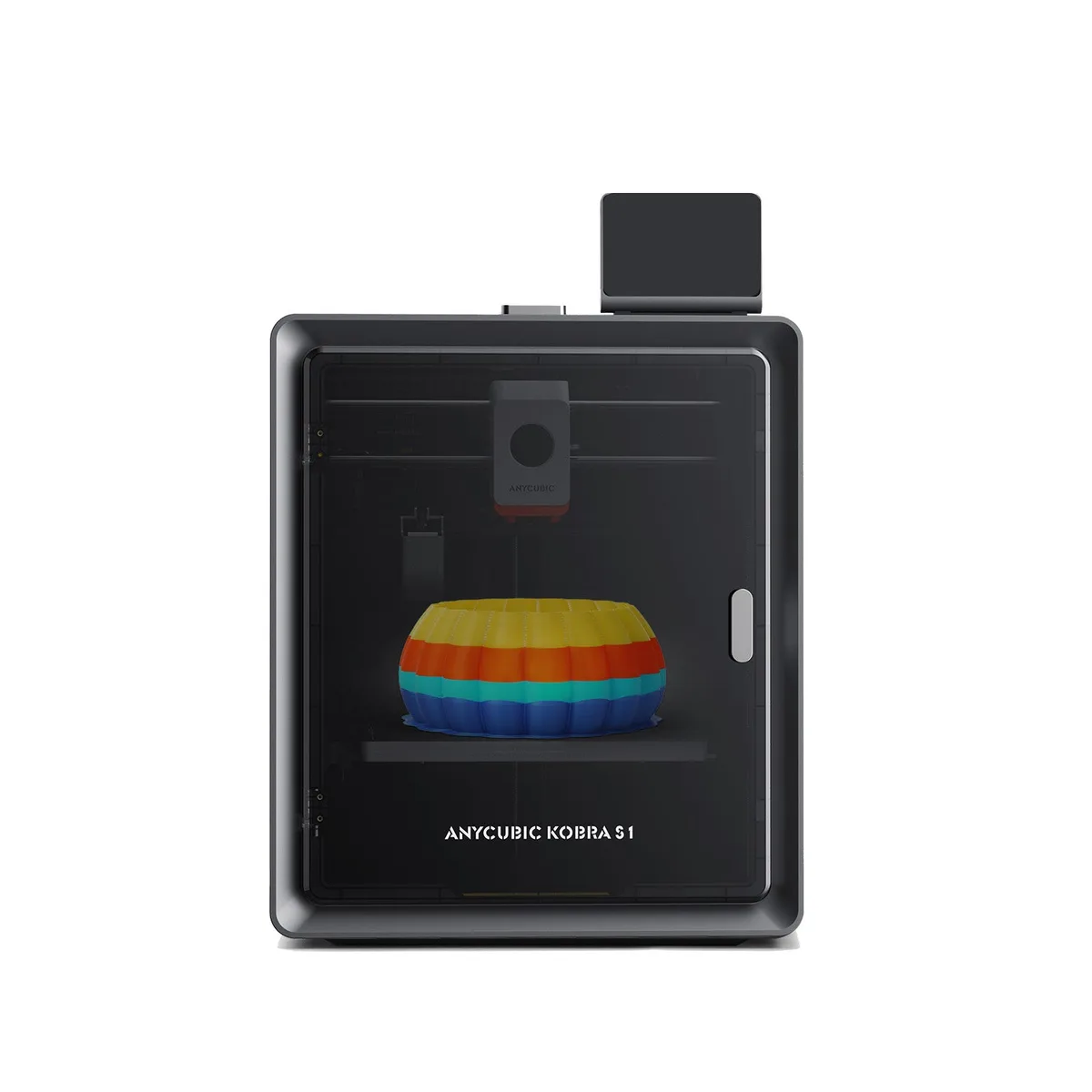
The Anycubic Kobra S1 Combo is a multi-colour 3D printing kit. It pairs the enclosed CoreXY Kobra S1 with the 4-slot ACE Pro filament unit. It prints 4 colours out of the box, and 8 with a second ACE Pro plus the 8 Colors Filament Hub. The printer has a 250 × 250 × 250 mm build volume. It runs at up to 600 mm/s with a 320 °C hotend.
It suits makers of figures, signs, logos, souvenirs and colour models who would rather not paint. It also suits shops and teams that run long jobs. The kit dries filament and switches to a backup spool by itself.
One nozzle, many colours. The Kobra S1 has a single nozzle. At each colour change, the print head cuts the filament. The ACE Pro retracts it and feeds the next colour. The printer then flushes the old colour out before it carries on. So colour prints take more time and filament than single-colour ones.
Flushing is adjustable. Anycubic Slicer Next lets you tune the flushing amount. If small parts with frequent colour changes show mixed colours, raise it slightly.
Size and speed. The build volume is 250 × 250 × 250 mm. Top speed is 600 mm/s, and Anycubic recommends 300 mm/s for normal use. Layer height runs from 0.05 to 0.28 mm with the standard 0.4 mm nozzle. 0.6 and 0.8 mm nozzles are supported.
Heat. A 320 °C nozzle, 120 °C bed and closed chamber let it print ABS, ASA and engineering materials.
Footprint. The Kobra S1 weighs about 18 kg and the ACE Pro about 4.6 kg. Set up together they need about 420 × 530 × 710 mm. Thai 220 V mains is fine.
The Kobra S1 prints PLA, PETG, ABS, ASA, TPU 95A, PC, PA and fibre-filled filaments. Not all of these can run through the ACE Pro.
Both use the same Kobra S1 printer with identical print specs. The Combo adds the ACE Pro, its signal cable and filament tubes. The Kobra S1 alone prints one colour from its spool holder.
Choose the Combo if you plan to print in colour from the start, or want drying and automatic refill. Choose the Kobra S1 if you mainly print one colour; you can still add an ACE later. Combo owners who want 8 colours add one more ACE Pro and the 8 Colors Filament Hub.
Print My Design is run by Septillion Co., Ltd., an official distributor of Anycubic in Thailand. The Kobra S1 Combo comes with a Thai warranty and after-sales support from our Thai team.
Companies can get a full tax invoice. Order online on this page, or buy at our True Digital Park, Seacon Bangkae and Central Sriracha branches.
The Anycubic Kobra S1 Combo 3D Printer costs ฿23,000 including VAT at Print My Design. It is in stock; stock at each branch is shown on this page. Delivery is free anywhere in Thailand.
It prints 4 colours with the included ACE Pro. Anycubic states the Kobra S1 supports up to two ACE Pro units, so up to 8 colours; eight colours also need the 8 Colors Filament Hub.
The build volume is 250 × 250 × 250 mm. Recommended speed is 300 mm/s, maximum 600 mm/s, with up to 20,000 mm/s² acceleration. Anycubic quotes about 13 minutes for a Benchy at 0.2 mm layers.
Yes, it is a fully enclosed CoreXY printer. It prints PLA, PETG, ABS, ASA, TPU 95A, PC, PA and carbon- or glass-fibre filaments. Colour work through the ACE Pro uses PLA, PETG, ABS, ASA, PA and PC; TPU and fibre filaments print single-colour from the spool holder.
Yes. The ACE Pro dries filament at up to 55 °C, before or during a print; drying during a print can run up to 24 hours. That keeps moisture-sensitive filament ready to print.
Yes. The Kobra S1 has a single nozzle, so each colour change flushes the old colour out. You can tune flushing in Anycubic Slicer Next, and fewer colour changes mean less waste.
Yes. Setup guides you through Wi-Fi, the app and LeviQ 3.0 auto-levelling. The ACE Pro loads filament itself and reads chipped Anycubic spools. AI failure detection, runout detection and power-loss resume help, at 44 dB or less in quiet mode.
The printer and its specs are identical. The Combo adds the ACE Pro for 4-colour printing, drying and automatic refill. The Kobra S1 prints one colour but can take an ACE later.
Yes. Print My Design is run by Septillion Co., Ltd., an official distributor of Anycubic in Thailand. Products come with a Thai warranty and after-sales support from our Thai team.
Yes. We issue full tax invoices to companies. Enter the company name and tax ID at checkout, or tell our staff at the branch.
Order online on this page, or buy at our True Digital Park, Seacon Bangkae and Central Sriracha branches.